

Accessory · Free
AirLance
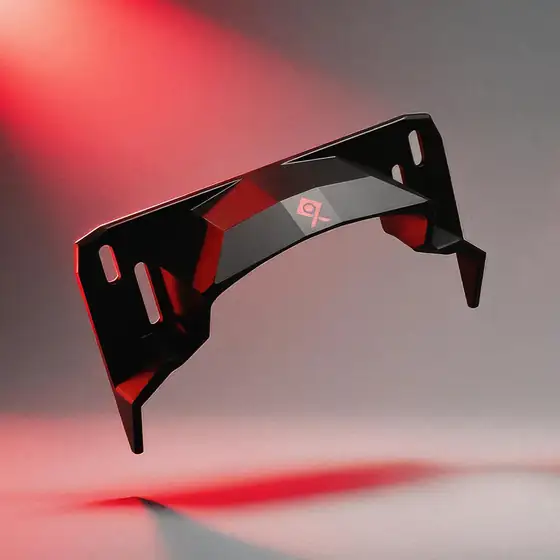
Aim assist for your fans. It bolts to a case fan and aims the air at your hardware. Print it yourself, the file is free.
Why we made it
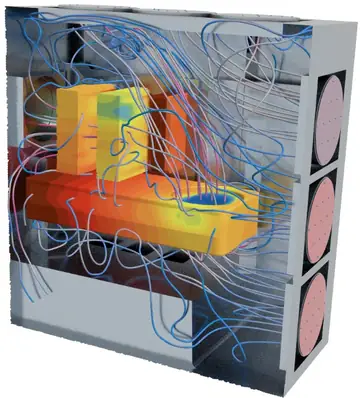
After we built Octa V1 we ran an airflow simulation on it, and on a popular tower case to compare. The result shocked us. Then it made sense.
The air from the top front fan never reaches your hardware. It goes straight out through the exhaust. Our own Octa V1 had the same problem.
The fix was not rocket science. What surprised us is that nobody had done it. AirLance guides that air down to your parts, and the fan gives up a little airflow to do it.
What you need
- Fans
- 120 mm and 140 mm
- One part fits both
- Fixing
- Two M5 × 10 mm screws
- About a minute, no special tools
- Direction
- Aim it up, down or across
- On a top fan, a bottom fan or a side fan
- Size
- 61 × 83 × 148 mm
- Printed in one piece
Download
Questions
Can I sell this?
Yes. Print it, change it, sell it. Credit Olicus as the designer and sell under your own name. The Olicus name and logo stay ours, so sellers use the files without the logo.
Which fans does it fit?
Any 120 mm or 140 mm case fan. The same part fits both.
How do I print it?
It is one piece and carries no load. We leave the settings to you and your printer. Found a setup that works well? Tell us on Discord and we will add it here.
Does it make my PC cooler?
Every setup is different. AirLance gives your hardware a chance to use air that used to pass it by. We believe that makes a difference. How big depends on your case.