

1What we thought
The PC case was born in the early 80s as an office machine. A box was cheap to bend from flat steel, and it fit under a desk. The first IBM PC ran on a 63.5 W power supply, so heat was nobody’s problem.
Today one graphics card can draw 575 W. The parts changed. The box stayed, and got more holes, more fans and more glass.
So we asked one thing. If nobody had ever built a PC case and you started from the heat, what would you draw?
2What the science says
A fan cools nothing by itself. It moves air, and the air carries the heat away.
Still air
- The warm air stays on the part, like a blanket.
Moving air
- Cool air comes in, takes the warmth and carries it off.
cool airwarm air
Your CPU and graphics card are the soup. Air takes the easiest way through a case. If the easiest way misses the hot parts, they sit in their own warmth. Three things get in the way.
- Corners. Picture a stadium emptying after a concert, with the exits in the corners. People bunch up and stop. Air does the same in a sharp 90° corner: it slows down, turns back on itself and keeps its heat. How much that matters differs from case to case.
- Used air. In a tower the graphics card sits under the CPU cooler and blows its warm air up into it. The CPU breathes what the graphics card just breathed out.
- Distance. Blow out a candle close to your mouth and it is easy. From across the room you have to blow much harder. Around a corner it hardly works. In most boxes the air comes in at the front and has to cross the whole case before it meets the heat.
3What we tested
Two ways, by two independent institutes.
RISE Research Institutes of Sweden measured real hardware. One set of parts was moved between Octa V1 and two well-known full towers. After ten minutes of stress the graphics card sat at 43.4 °C in Octa V1, against 45.1 °C and 46.1 °C. The CPU ended level: 88, 88 and 89 °C.
FS Dynamics simulated the air through Octa V1 and through a standard tower with the same heat inside. The hottest point on the CPU cooler was 71.0 °C in Octa V1 and 87.4 °C in the tower. One thing was not equal: Octa V1 had four intake fans, the tower three.
The set-up: where the fans blow
Reference tower
- In: three fans at the front.
- Out: three in the roof, one at the back.
Octa V1
- In: two at the front, one in the lower front corner, one at the back.
- Out: two in the roof, one in each top corner.
The result: heat in the air
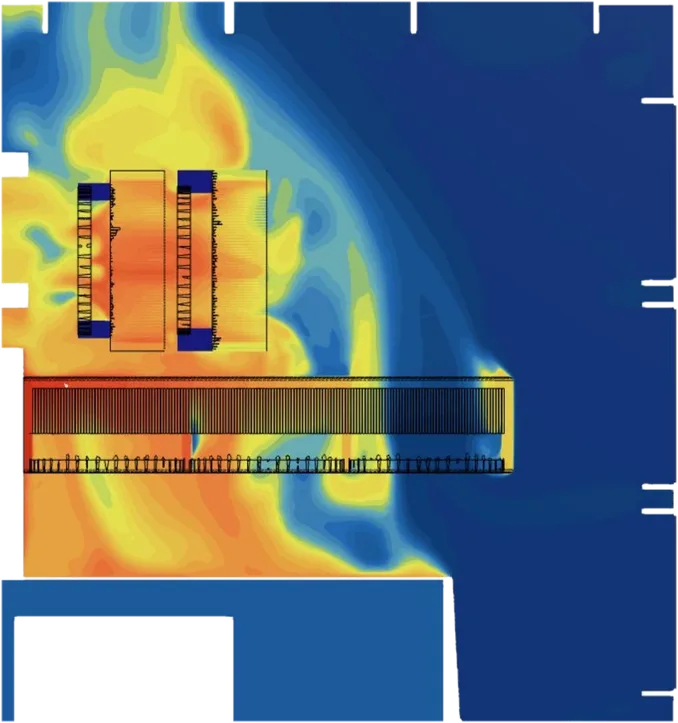
Reference tower
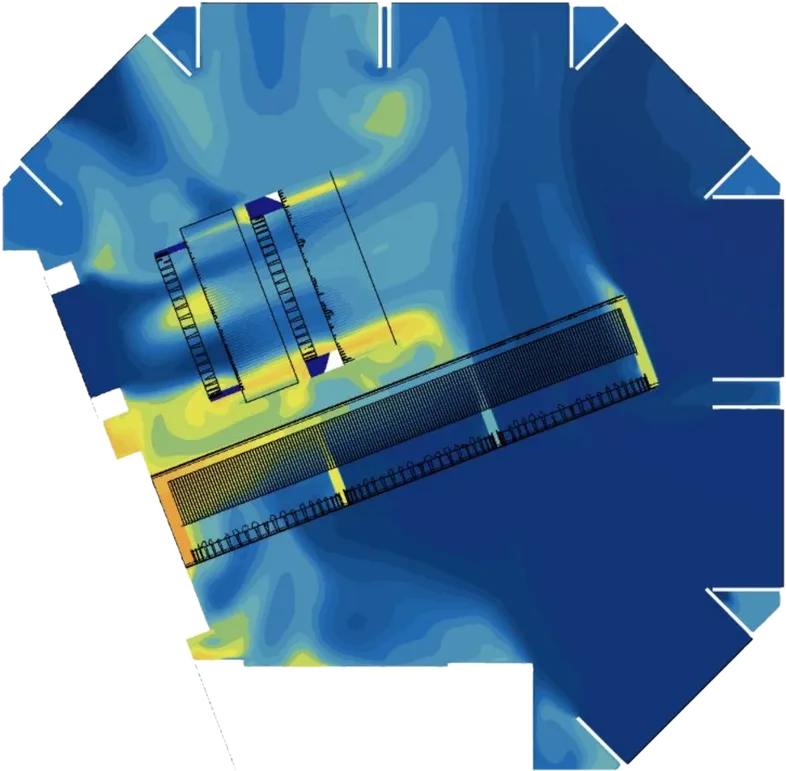
Octa V1
Our reading
- Reference tower. Warm air fills the back half, around the CPU cooler and under the graphics card.
- Octa V1. Cool air reaches the CPU cooler from the back and the graphics card from the front. Both sit in cooler air.
under 20 °C over 75 °COne scale for both pictures.
RISE report P121452, 19 to 20 December 2024: Intel Core i7-13700K, Asus RTX 4080, six case fans at 50%, room at 22.5 °C, ten minutes per phase. Noise was not measured. FS Dynamics report FSD1024294, 7 October 2025: a simulation of the cooling parts, CPU 170 W and GPU 575 W, Octa V1 with four intake fans and the tower with three.
All the numbers, and how we read them4What we concluded
Aim the air first, then draw the walls. Cool air comes in at the front and goes straight at the graphics card. The CPU cooler gets its own air from the back. Warm air rises and leaves through the roof and the top corners.
Of our three thoughts, the tests back one clearly, as we read them: used air. In the simulation’s heat pictures the tower’s warm air gathers around the CPU cooler. In Octa V1 each part gets its own. Corners are known airflow physics, but these pictures show no clear difference between the two cases there. Distance was not tested on its own.
And the eight sides? The air gave us the angled faces at the front and the tilted board. The octagon is the design. The cooling comes from where the fans sit and where they point.
What it cost us
An octagon is harder to make than a box. It took 16 prototypes and 4 versions to get here. It is also a big case.
Still open
Is the octagon the best shape for air? Probably not. It is the best we could build today.